Temple maps, drawn from a seed
Most map generators stop at the town and leave the temple a blank square. Mapsmith draws the inside: a porch on the street, the nave with its pillars and pews, and the vestry, sanctuary and store room behind it. Every room is numbered and furnished and has a line on what’s there. The temple has a high priest and a hook, and stairs in the vestry go down to a crypt.
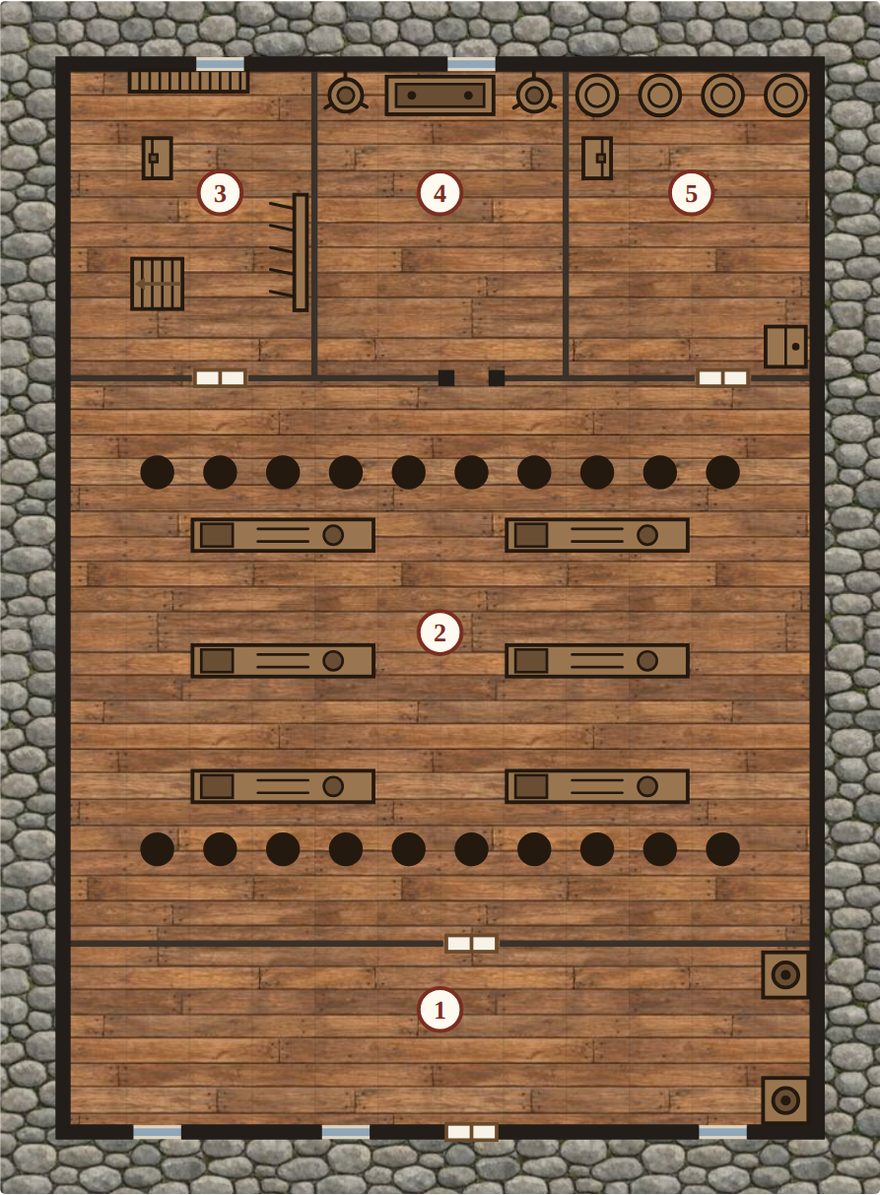
The Temple of the Tide. The same seed always draws the same temple.
What one temple comes with
This is the one the button above opens, as Mapsmith wrote it:
- About the place: “Its bells mark the hours for the whole town. The high priest is Ilse Bracken.”
- A hook: “The crypt under the floor has been sealed for years, and now there are sounds in it.”
- The porch: “A bench for beggars and a box for alms, nailed down.”
- The nave: “Pillars of old stone, and every footstep echoes.”
- The vestry: “Where the priests dress, and where they talk when the doors are shut. Stairs go down to the crypt under the temple.” Hidden there: “Letters tied with a ribbon, never meant to be found.”
- The sanctuary: “The altar, a lamp that never goes out, and a rail no one crosses but the priests.”
Change a word of the seed for another temple, or pick another building from the same list: an inn, a guildhall, a library, a bathhouse, barracks and more.
The crypt below
That hook wants a crypt, and Mapsmith draws one: a small crypt of six rooms on its own map. In a town map, the temple’s note comes with both, the temple plan and the crypt under it.
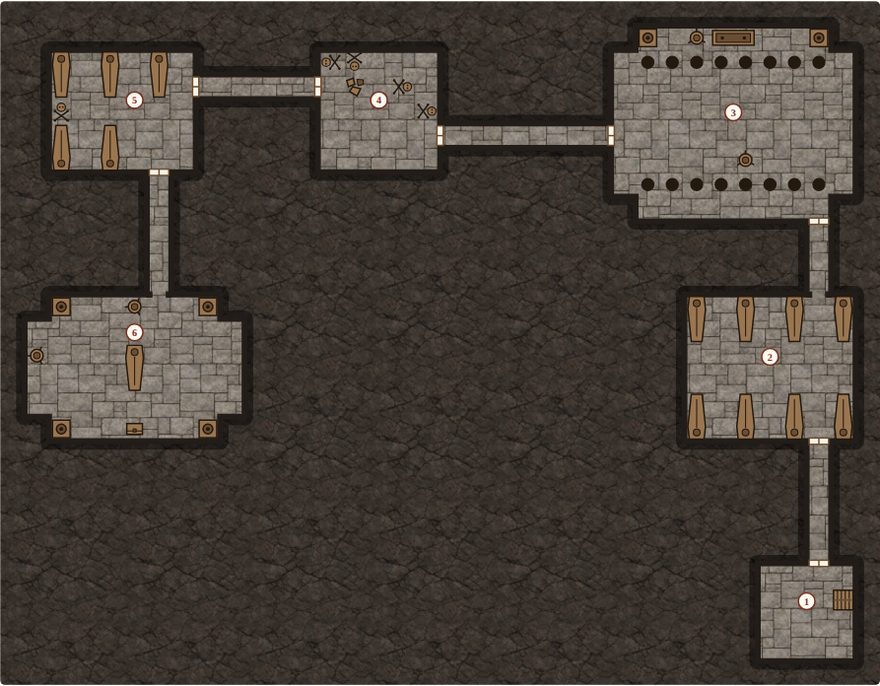
- What happened here: “The Penlow family buried their dead here for six generations, each one deeper than the last. The last of the line was laid in the great tomb ten years ago, and the doors were sealed. Now something has made its nest in the great tomb.”
- The burial vault: “Sarcophagi along both walls. One lid is off and set neatly beside it.”
- The founder’s tomb: “The great tomb. Hands have been at the dust on the lid.” In it, “a reliquary holding a finger bone and a garnet.”
Into your virtual tabletop
Mapsmith Pro saves the temple as a Universal VTT file (.dd2vtt): the players’ map with no numbers, plus every wall, door, window and light already placed. The pillars are walls too, so tokens hide behind them. This temple has 41 walls, 4 doors, 5 windows and barred gates and 2 lights, the lamps either side of the altar.
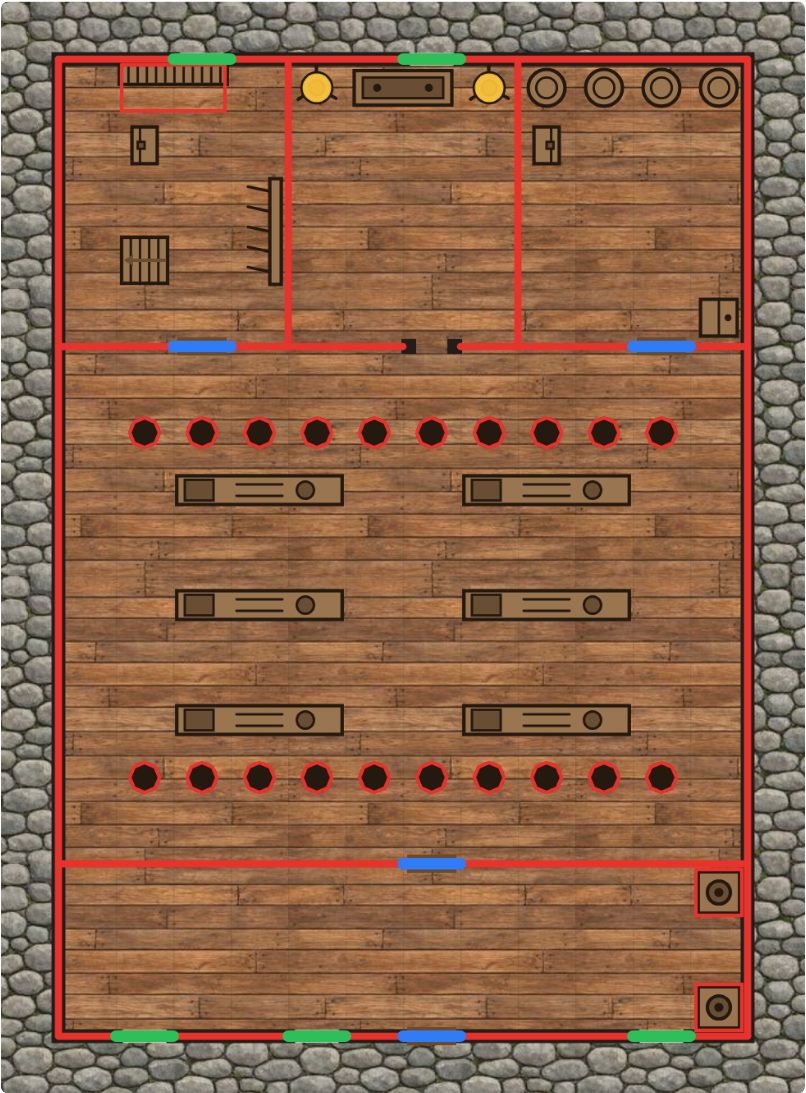
Walls in red, doors in blue, windows in green, lights in yellow. Without a key, the Save for virtual tabletop button shows you this for any map before you buy.
- Foundry VTT: the Universal Battlemap Importer module reads the
.dd2vttas a scene with its walls, doors and lights. Step by step. - Roll20: import the
.dd2vttand the walls, doors and lights come in on the dynamic lighting layer. - Owlbear Rodeo: the Scene Importer extension with Dynamic Fog. Step by step.
Free, any map saves as a PNG named with its size in squares, so Owlbear Rodeo sets the grid itself. Pro is $6 once, not a subscription, and the same key saves towns, regions, dungeons and ships too.
Play it alone
Press Explore and the map hides: open the temple or the crypt one room at a time, with what you find rolled as you go. Search a room for secret doors on a 5 or 6. More on the solo crawl.
Where it runs
In your browser, free, with nothing to install, and on itch. If you keep your campaign in Obsidian, Mapsmith is a free plugin there (Community plugins, search Mapsmith), and the temple sits in your note with a note for every room. One Pro key works in both.
Mapsmith is free and open source (MIT); Pro adds the VTT save. Made by Bananafest Destiny. The code was written with AI, and the textures under the maps (stone, rock, wood) were made with an image generator; the maps themselves are drawn by code, and the Plain look uses no textures at all. Foundry VTT, Roll20, Owlbear Rodeo and Obsidian are their owners’ trademarks, named only to say what Mapsmith works with.